
TAKE A PERFECT PICTURE
Passport & Visa Photo Guidelines
Make sure your photo is accepted by following our easy to understand guidelines.
Since 2007, Swift has helped travelers get their passports and visas right the first time. That includes reviewing a lot of photos. Take a minute with the guidelines below before you upload.
Swift can size and print your passport and visa photos for a nominal fee of $15. Before sending your photo, please be sure to follow all of the guidelines below:
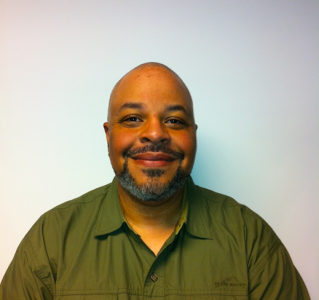
What gets accepted:
- Plain white wall behind you. No windows, doors, brick, light fixtures, picture frames, or pets in the background.
- Upload as a .jpg or .jpeg file. Other formats won’t process correctly on our end.
- Frame from mid-chest up. Leave a little room above your head, and make sure both ears are visible.
- Step back, not closer. Too close almost always gets rejected. Too far back is easy to crop down.
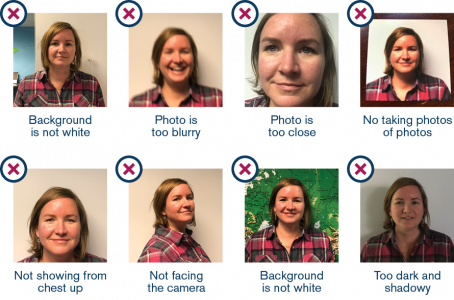
What gets rejected:
- No professional headshots. Face the camera straight on. Save the moody side-angle for LinkedIn.
- No scans of printed photos. The State Department can tell, and they will reject it.
- Don’t resize, crop, or filter. Send us the raw photo. We’ll handle the formatting. That part is on us.
- No selfies. Hand the phone to someone else. Even your kid will do better than the arm-stretched-out version.
- No glasses. Not even readers. Not even the ones you swear you can’t see without.
From The Swift Blog
When Might a Business Traveler Need a Second Valid U.S. Passport?
October 21, 2026
No Comments
Arriving at a Holiday Home in Mijas: Check the Door Before the Code
October 20, 2026
No Comments
How to Handle Last-Minute Passport Issues Before a Group Trip
October 14, 2026
No Comments